A Deep-dive into Memory Management in Python
Understand and manage critical memory components in python

Python & Memory
Speaking in terms of python, memory was never a concern to much of the programmers. All because we never encountered it on the surface, everything that needed to be handled at the memory level, well.. python implicitly does it for you. But, that's not always so reliable, suppose you are building an application and that runs on only high end computing devices, (unless its a specific application indented to be used in such a scenario), its pretty much useless, we cannot count that in as a solution to anything. So, there comes the devil, the memory, one that was overlooked for so long that we, at some point, forgets about such a thing. It shouldn't be left like that, its not something to be left like that. Hence, we are having the need to understand it, not just understand it vaguely, but understand it properly.
Introduction
Python (a.k.a CPython), as we all know is an object-oriented programming language or more cliche way of describing it as multi-paradigm language. The quantity of memory that needs to be stored or processed has a direct influence on the underlying memory allocation and freeing methods and routes. Which greatly affects the performance, especially when large amount of data is handled improperly without much care for memory management. Some of the seemingly normal things that can affect the performance of your script/app includes,
- Unnecessarily importing modules/libraries and not using them. Or importing the whole library, just to use a constant, or a simple function from within. Or simply just forgot that it was imported (Happens!).
- Holding references to large object/class instances even after their use has been over.
- Reading large amounts of data from disk/network and storing it in variables, such as reading a whole file into a list and all those sorts of things.
And looking a bit deeper into the memory realm, we see stuff like mapped interpreter, shared libraries, interpreter internals, thread stacks and much more which eats up memory. So, we'll look at how these kinds of memory holes can be handled gracefully.
The Memory Realm
Before diving deeper into the memory management, its best to have a proper understanding of python's memory model and some of the core terminologies which we will encounter along the way. Unit sizes differ a bit in versions and differs a lot when build changes too, sizes are generally larges in 64-bit builds. It is advised to use all the sizes mentioned in the article as "Check your version".
Terminologies
- Block
The smallest unit that is handled out by python. One block holds one object, or one piece of an object, such as a list's pointer array. Block sizes are multiples of 16 bytes (and goes up to 512 bytes), and has 32 size classes.
A 40-byte request is rounded up to 48-byte block. The 8 wasted bytes are internal fragmentation, the price of the scheme's speed.
- Pool
A fixed size slice of an arena, often size of KiBs. It serves one size class only.
Pools begin with a small header which holds properties of the pool, such as the size class (32 B Blocks, 64 B Blocks, etc), how many blocks are in use, a pointer to the first free block, and links to the neighboring pools.
A pool can be in one of 3 states, Used/Full/Empty. - Arena
This refers to the large chunk that is requested by pymalloc to the OS (via mmap or similar). And also, this is the only unit returned to the OS by pymalloc, only when all the pools within the arena are free or empty.
Allocation prefers the most-full arenas, which gives nearly empty arenams a chance to drain completely and be released. - Free List & "Fresh" Space (Inside a Pool)
Freed blocks are not erased, rather, their first bytes are reused as a link to the next free block, forming a list at no extra memory cost. New allocations pop from that list first.
Space never handed out yet is "Fresh" and is issued in order, which the pool tracks with an offset. - Size Class
Its a predefined memory bucket that groups a range of requested byte sizes together and rounds them all up to the same fixed block size. Kind of like the modulo operation. (for example, when requesting 33 bytes, the nearest unit size if 48 and hence, that is allocated).
Some more terms that are not that important, but still worth knowing,
| Term | Meaning |
|---|---|
| Virtual memory | The address space a process sees. Most of it isn't backed by physical RAM until used |
| OS page | The kernel's unit of memory, usually 4 KiB. Physical RAM is assigned per page |
| RSS | The pages of the process currently resident in physical RAM. Counts touched pages, not reserved ones |
mmap |
System call that maps a new region of address space (used for arenas, large allocations, files) |
brk |
Older system call that grows the main heap segment by moving its end upward |
malloc |
The C library's general-purpose allocator. Handles everything pymalloc doesn't |
| Heap | Memory managed by malloc. Not the same thing as pymalloc's arenas |
| Object header | The 16 bytes at the start of every object: refcount and type pointer |
| Refcount | Per-object counter of references. Reaching zero frees the object immediately |
| Free list (object level) | Per-type cache of dead objects (floats, tuples, lists) reused without calling the allocator |
| Generation | A group of GC-tracked objects scanned together by the cycle collector |
| Allocation domain | One of three C API families (raw, mem, object) deciding which allocator gets a request |
A Connection
Barely knowing these terms doesn't help at all, so, as a starter to connect all these, this is how each of them are related to one another;
An object, lives inside one block; The block lives inside one pool; Pool inside an arena; Arena inside a virtual page from the OS.
Allocation
As we mentioned earlier, memory allocation process as branch based on the size of data which is being requested. We shall explore them briefly.
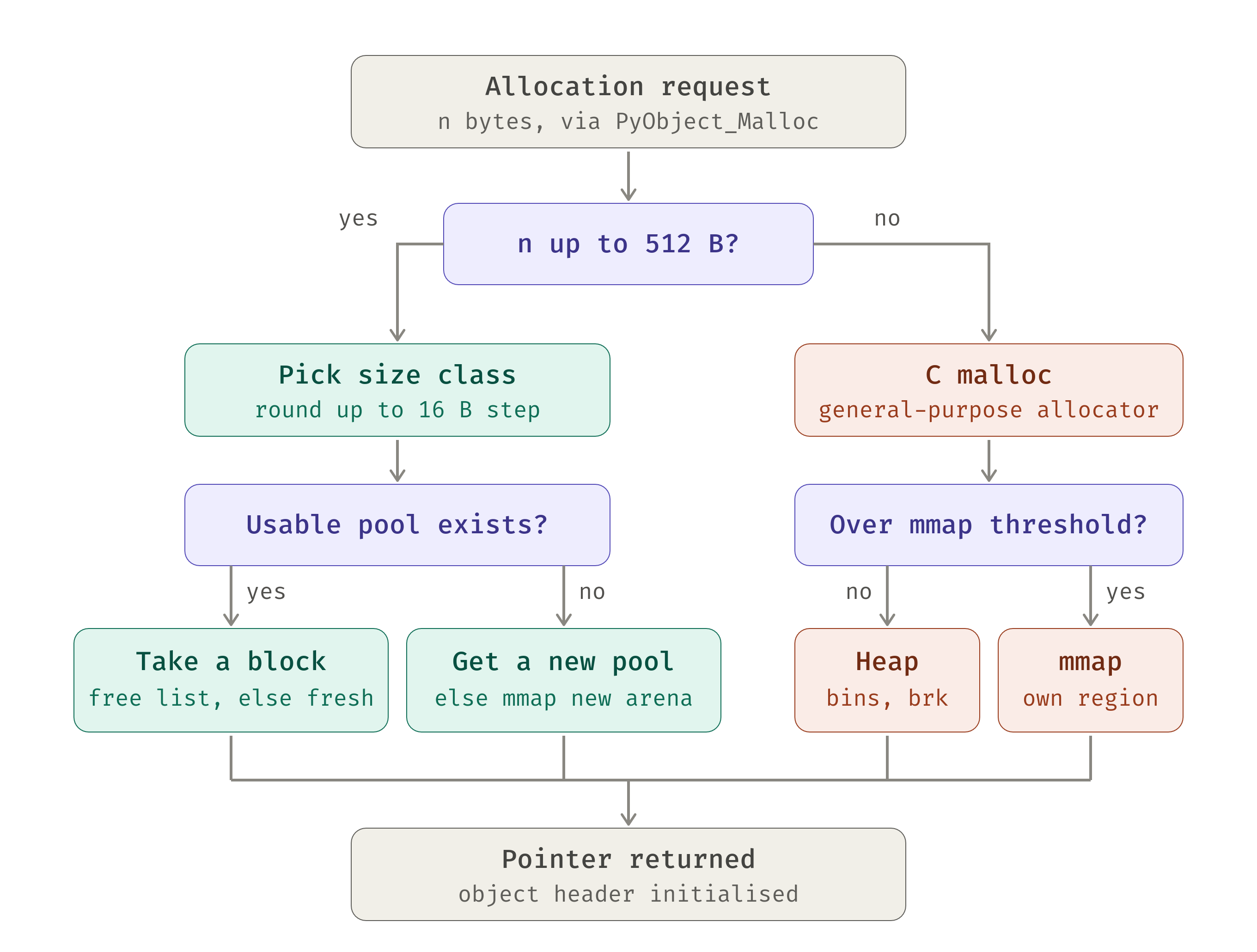
Lets walk through the process of executing a typical python statement, for instance consider a class instantiation Foo().
Before the allocator is even reached
During the execution of a typical python statement, the following are bound to happen, and as we mentioned earlier, based on the size of memory that needs/ is requested to for allocation, the route it takes to acquire that memory differs and we shall explore both the routes.
An initializer calls the __call__ method first and that subsequently invokes the __new__ method of the type and allocates through its allocation slot, which computes the total size.
The total slot size comprises of object's fixed size, 16-byte GC pre-header (if the type is GC tracked), plus any variable part. Note that some type checks are cache first such as float, tuple, lists and dict keeps free list of dead objects, and small integers are pre allocated singletons.
when the said cache is missed, only then, a call to PyObject_Malloc(n)
Allocation Routes
Branch 1 - n is 512 bytes or less (pymalloc)
At first the request is rounded up to nearest multiple of 16 and converted to and index. Pymalloc keeps one list of partly-used pools per size classes, indexed directly by the class index. If the list has a pool, its used, which is effectively the step in which we find a usable pool. Next up, we gotta find a block within the pool which we can us, that is found by trying these two methods in order, Free list & Free space. And if the pool just became full, it is unlinked from the usable list, so that the next request doesn't get confused with seeing a filled block in the free list.
If no pools are empty, and a new one is needed, in such a scenario, a new pool is pulled from an arena, and if its not found there too, pymalloc requests a new arena from the OS and pools are carved from it then. Also note, everything managed is linked together, so in this case, the created arena is linked using a free list. And the requested arena is registered so it can later recognize its own address.
So, in essence, if one step fails, go higher up, performs the required allocation procedure, then again come back along the chain of process and try again.
Simple!
Branch 2 - n is over 512 bytes (C malloc)
When the request is larger than 512 bytes, its no longer handled by pymalloc, instead, its handled directly by the underlying C malloc. Here it branches out again into 2 branches based on the threshold (by default, the threshold value is 128KiB, adjusted dynamically).
On glibc, the
mmapthreshold can be tuned using mallopt settings or MMAP_THRESHOLD options. Default threshold for 64-bit system is 128 KiB.
If the request is below the threshold, glibc first checks per-thread caches and internal arena bins for previously freed chunk of a suitable size. Since reusing a cached or binned chunk avoid syscalls and reduces fragmentation. When a free chunk is found, if its larger then what's required, glibc can split it and return the leftover to a bin and adjacent free chunks are merged to form a larger continuous block. If no existing free chunk satisfies the request, glibc carves space from the top chunk at the end of current heap segment. If the top chunk is not large enough, then the allocator expands the heap using brk or sbrk on the main arena or allocating a new mmap backed heap segment for a non-main (per-thread) arena.
Freeing returns the chunk to glibc's bin rather than immediately relieving the memory, since reusing is much more efficient that cleaning and reallocating. Unless and otherwise the top chunk grows too much and triggers trimming.
If the request is above the threshold, instead of carving from the top of a heap or so, glibc requests a dedicated mapping directly from the kernel via mmap (marked with the IS_MAPPED in the chunk metadata). Here, freeing immediately returns the region to the OS after unmapping it right away.
Such large temporary buffers can reduce the program's RSS(Resident Set Size, the portion of process' memory held in physical RAM)
After the pointer comes back
Once pymalloc or malloc hands back raw memory pointer, the memory is just uninitialized bytes. CPython must turn the raw block into a valid python object and actually populate its backing pages in hardware.
Every python object in CPython starts with a standard C struct header(PyObject/PyVarObject), before python code can use this object. CPython writes two critical fields in the front of that memory, Reference Count and Type Pointer.
Reference count is a flag that is used to track whether the object is being referred anywhere or not. Its set to 1 is its referred. The Type pointer points to the type's structure which tells the interpreter what methods, operators and memory layout the object holds.
Since simple objects like
int,float,stretc cannot hold references to other objects (because their internal C structs store primitive values or raw byte buffers, not C pointers to other python objects).
What We Got
Now that we have an overall idea of the process of a acquiring memory and freeing them and the routes which can be taken for this to be achieved, we shall explore ways by which we can use these processes to our advantage for much more memory efficient scripts.
What Next
Follow along with the series to get started with methodologies and strategies.
About the author
- Backend Developer and tech enthusiast exploring new tech. Beyond technical development, I actively engage in open-source communities, collaborative projects, and technical mentorship, where I contribute to knowledge sharing and community-driven learning. Learns to get it done, rather than get it done somehow.
Comments
Join the discussionNo comments yet. Be the first to comment.